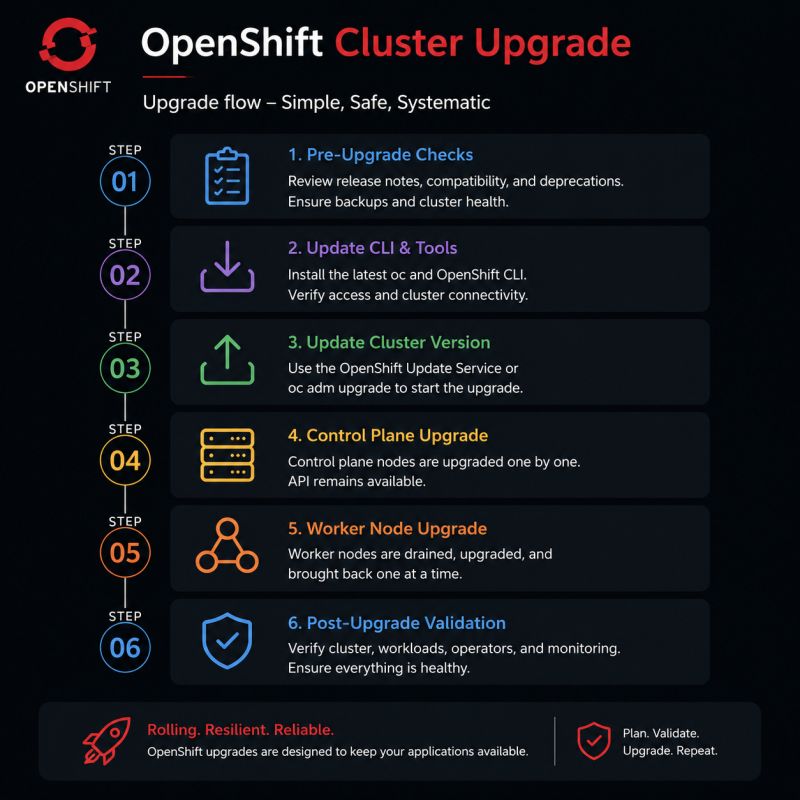
Keeping an OpenShift cluster up to date is more than installing a new version. A well-planned upgrade ensures your applications remain available while the platform safely updates every critical component in the correct order.
One important detail that’s often overlooked is that OpenShift doesn’t upgrade the control plane or worker nodes first. Instead, the Cluster Version Operator (CVO) orchestrates the entire upgrade process by updating cluster operators before any node upgrades begin.
Let’s walk through the actual OpenShift cluster upgrade workflow.
Why Upgrade OpenShift?
Regular upgrades help you:
Access new features and enhancements
Improve cluster security
Receive bug fixes and performance improvements
Stay on a supported OpenShift release
Reduce operational risk
Because OpenShift manages the entire platform, upgrades are automated and performed in a controlled sequence.
OpenShift Cluster Upgrade Workflow
✅ Step 1: Perform Pre-Upgrade Checks
Before starting the upgrade, ensure your cluster is ready.
Recommended checks:
Review release notes
Verify the compatibility matrix
Check Cluster Operator health
Confirm all nodes are Ready
Identify deprecated APIs
Backup critical workloads and cluster configuration
Verify sufficient cluster resources
A healthy cluster is the foundation of a successful upgrade.
✅ Step 2: Update CLI Tools
Upgrade your administration tools to match the target OpenShift version.
This includes:
oc CLI
Automation scripts
CI/CD pipelines (if applicable)
Also verify connectivity and administrative access before proceeding.
✅ Step 3: Start the Cluster Upgrade
Initiate the upgrade using either:
oc adm upgrade
or through the OpenShift Web Console using the OpenShift Update Service (OSUS).
Once the upgrade begins, the Cluster Version Operator (CVO) takes control of the entire process.
✅ Step 4: Cluster Version Operator (CVO) Updates the Platform
This is the core of the OpenShift upgrade process.
The Cluster Version Operator (CVO) is upgraded first and then coordinates updates across the entire platform.
The CVO:
Determines the desired OpenShift release
Downloads release payloads
Applies manifests
Coordinates component upgrades
Tracks upgrade progress
Handles retries when necessary
Think of the CVO as the orchestrator responsible for upgrading the entire cluster.
✅ Step 5: Upgrade Cluster Operators
Before any node is upgraded, the CVO updates the Cluster Operators.
Examples include:
Authentication Operator
API Server Operator
Controller Manager Operator
Scheduler Operator
Machine Config Operator (MCO)
Networking Operator
Image Registry Operator
Monitoring Operator
Ingress Operator
Storage Operators
Each operator is upgraded and validated before moving to the next stage.
This ensures the platform components are running the new version before the underlying nodes are updated.
✅ Step 6: Upgrade the Control Plane
After the operators are healthy, OpenShift upgrades the control plane nodes.
The process is sequential:
Upgrade one control plane node
Reboot if required
Wait until it becomes Ready
Continue with the next node
Throughout the upgrade:
The Kubernetes API remains available.
The etcd quorum is maintained.
Cluster management continues without interruption.
✅ Step 7: Upgrade Worker Nodes
Next, the Machine Config Operator (MCO) upgrades worker nodes.
For each worker node, OpenShift:
Cordon the node
Drain application workloads
Apply the new machine configuration
Reboot if required
Validate node health
Return the node to the cluster
The process repeats one node at a time, ensuring application availability during the upgrade.
✅ Step 8: Perform Post-Upgrade Validation
Once the upgrade is complete, verify that everything is operating correctly.
Check:
All Cluster Operators report Available=True
No operators are degraded
All nodes are Ready
Applications are running normally
Routes and networking function correctly
Storage volumes are healthy
Monitoring and logging services are operational
A successful validation confirms the cluster is fully upgraded and stable.
The Cluster Version Operator (CVO) orchestrates the entire upgrade process.
Cluster Operators are upgraded before any node upgrades begin.
Control plane nodes are upgraded sequentially to maintain API availability.
Worker nodes are upgraded one at a time using the Machine Config Operator (MCO).
Rolling upgrades minimize disruption and help maintain application availability throughout the process.
Conclusion
An OpenShift cluster upgrade is a carefully orchestrated process rather than a simple version update. The Cluster Version Operator coordinates the upgrade by first updating platform operators, then the control plane, and finally the worker nodes. This phased approach ensures consistency, reliability, and minimal downtime, allowing applications to remain available while the platform evolves.