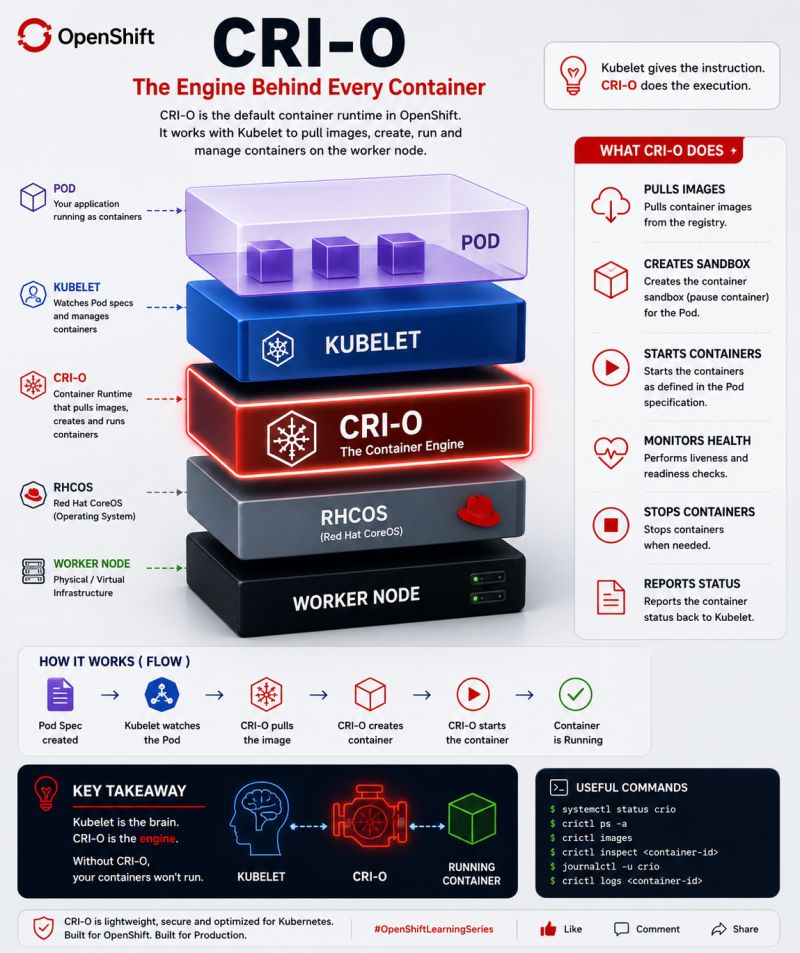
What Actually Starts Your Container in OpenShift? A Deep Dive into CRI-O
Introduction
When a developer deploys an application to OpenShift, the process looks simple:
oc create deployment nginx --image=nginx
A few seconds later, a running container appears.
But what actually happens behind the scenes?
Many people assume:
- The Scheduler starts the container.
- The Kubelet creates the container.
- Kubernetes directly runs the image.
That is not exactly correct.
The Scheduler and Kubelet have important roles, but the component that actually pulls the image, creates the container, and starts the workload is CRI-O.
CRI-O is the container runtime engine that powers OpenShift worker nodes.
The Container Startup Journey in OpenShift
The complete flow looks like this:
Developer
    |
    |
oc create deployment
    |
    |
API Server
    |
    |
    v
Scheduler
    |
    |
Assigns Pod to Worker Node
    |
    |
    v
Kubelet
    |
    |
Uses CRI Interface
    |
    |
    v
CRI-O
    |
    |
Pull Image
Create Container
Configure Runtime
Start Process
    |
    |
    v
Running Container
Each component has a specific responsibility.
Step 1: The API Server Receives the Request
Everything starts with the Kubernetes API Server.
Example:
oc create deployment web --image=nginx
The request creates Kubernetes objects:
- Deployment
- ReplicaSet
- Pod
The API Server stores the desired state in etcd.
Example desired state:
apiVersion: v1
kind: Pod
metadata:
  name: web-pod
spec:
  containers:
  - name: nginx
    image: nginx
At this point:
No container exists yet.
Only a request describing what should exist.
Step 2: The Scheduler Chooses the Node
The Kubernetes Scheduler watches for Pods without an assigned node.
Example:
Pod:

web-pod

Node:

Not assigned
The Scheduler evaluates:
- CPU availability
- Memory capacity
- Node labels
- Taints and tolerations
- Affinity rules
Example decision:
web-pod

        |
        v

Worker Node 3
The Scheduler updates the Pod:
spec:
  nodeName: worker-3
Important:
The Scheduler does not:
- Pull images
- Create containers
- Start processes
It only makes the placement decision.
Step 3: The Kubelet Takes Control
Every OpenShift worker node runs a Kubelet process.
The Kubelet is responsible for ensuring:
“The containers running on this node match the desired Pod specification.”
The Kubelet continuously watches the API Server.
It sees:
Pod assigned:

web-pod

Node:

worker-3
Now the Kubelet begins the startup process.
However, the Kubelet does not directly create containers.
It communicates with the container runtime.
That runtime is CRI-O.
Step 4: Kubelet Talks to CRI-O Through CRI
Kubernetes does not directly depend on one container runtime.
Instead, it uses the:
Container Runtime Interface (CRI)
CRI is an API contract between Kubernetes and the runtime.
Architecture:
              Kubernetes

                  |
                  |
              Kubelet

                  |
                  |
             CRI Interface

                  |
                  |

                CRI-O

                  |
                  |

          Linux Container Runtime

                  |
                  |

              Container
The Kubelet sends commands like:
Create Pod Sandbox
Pull Image
Create Container
Start Container
through CRI.
Step 5: CRI-O Pulls the Container Image
The first job of CRI-O is obtaining the image.
Example:
Image:

registry.redhat.io/ubi9/nginx
CRI-O checks:
Is the image already present?
If not:
CRI-O
   |
   |
Container Registry
   |
   |
Download Image Layers
Images are stored locally on the worker node.
Example:
crictl images
Output:
IMAGE
nginx
ubi9
redis
Step 6: CRI-O Creates the Container
After downloading the image, CRI-O creates the container.
A container is not a virtual machine.
It is a Linux process with isolation.
CRI-O configures:
- Linux namespaces
- cgroups
- mounts
- networking
- security policies
Example:
Container

+----------------------+
| Process              |
|                      |
| Namespace Isolation  |
|                      |
| Resource Limits      |
|                      |
+----------------------+
Step 7: CRI-O Starts the Container Process
The container image contains metadata describing what should run.
Example Dockerfile:
FROM nginx

CMD ["nginx","-g","daemon off;"]
The CMD becomes the main container process.
CRI-O launches:
nginx process
       |
       |
       v

Container Running
Now the Pod becomes:
oc get pods
Example:
NAME       STATUS
web-pod    Running
What Role Does the Linux Kernel Play?
CRI-O does not create isolation itself.
It uses Linux kernel features.
Important components:
Namespaces
Provide isolation:
- Process namespace
- Network namespace
- Mount namespace
- PID namespace
Example:
A container sees:
PID 1
but the host sees:
PID 25000
cgroups
Control resources.
Example:
Container limit:
resources:
 limits:
   cpu: "2"
   memory: 4Gi
CRI-O uses cgroups to enforce:
Maximum CPU:

2 cores

Maximum Memory:

4GB
CRI-O vs Docker
Many administrators ask:
“Does OpenShift use Docker?”
Modern OpenShift does not use Docker Engine as the default runtime.
OpenShift uses:
Kubernetes
    |
    |
Kubelet
    |
    |
CRI-O
Docker was replaced because Kubernetes only needed a CRI-compatible runtime.
Advantages of CRI-O:
- Lightweight
- Kubernetes-focused
- Open standards based
- Better integration with OpenShift security
Troubleshooting Container Startup Problems
When a Pod fails to start, follow the startup chain.
1. Check Pod Status
oc get pods
Example:
NAME      STATUS
app       ImagePullBackOff
2. Check Pod Events
oc describe pod app
Look for:
Failed to pull image
or:
FailedCreateContainer
3. Check CRI-O Status
On the worker node:
systemctl status crio
Example:
crio.service
Active: running
4. Use crictl
CRI-O can be inspected using:
crictl ps
Running containers:
CONTAINER ID
IMAGE
STATE
Images:
crictl images
Container Startup Timeline
A simplified timeline:
0s
|
| User creates Deployment
|
v

API Server stores desired state

|
v

Scheduler selects Worker Node

|
v

Kubelet detects assigned Pod

|
v

Kubelet calls CRI-O

|
v

CRI-O pulls image

|
v

CRI-O creates container

|
v

CRI-O starts process

|
v

Application Running
Technical Takeaway
The responsibility chain in OpenShift is:
| Component | Responsibility |
|---|---|
| API Server | Stores desired state |
| Scheduler | Chooses worker node |
| Kubelet | Manages Pod lifecycle |
| CRI-O | Creates and starts containers |
| Linux Kernel | Provides isolation and resource control |
The Scheduler does not start containers.
The Kubelet does not directly create containers.
CRI-O is the engine that turns a container image into a running process.
Just like a car needs an engine to move, every OpenShift worker node needs CRI-O to run containers.
Without CRI-O:
- Images cannot be pulled
- Containers cannot be created
- Applications cannot start
Understanding CRI-O is essential for troubleshooting OpenShift deployments, designing secure clusters, and operating production Kubernetes platforms.