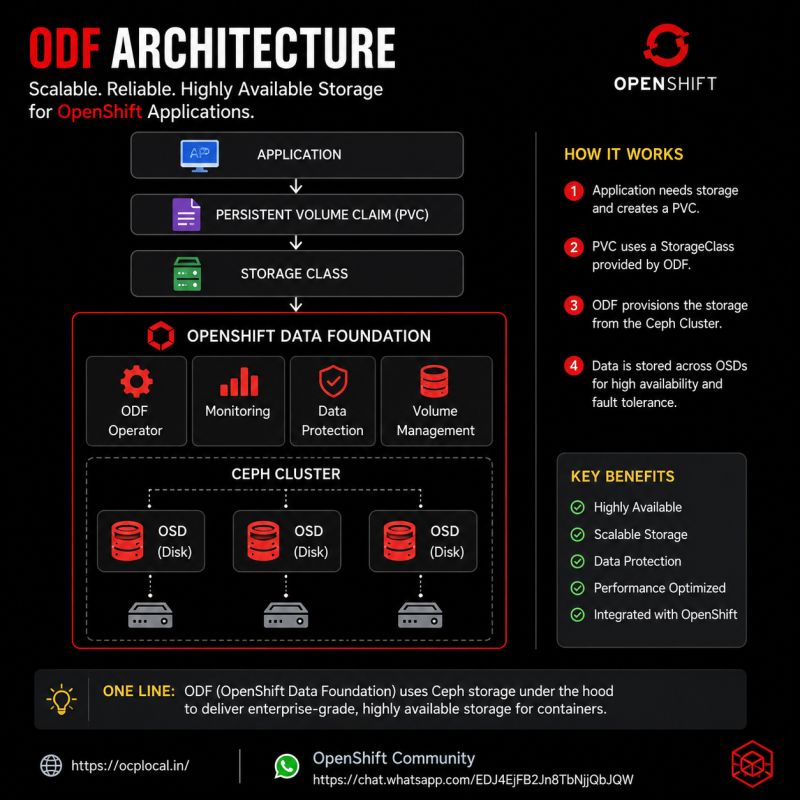
Understanding Storage in OpenShift: Deep Dive into ODF and Ceph Architecture
Introduction
Storage is one of the most important building blocks of any Kubernetes or OpenShift platform. While stateless applications can easily scale horizontally, enterprise workloads such as databases, messaging platforms, AI/ML pipelines, and content management systems require reliable, persistent, and highly available storage.
OpenShift provides multiple storage options, but for enterprise production environments, OpenShift Data Foundation (ODF) is one of the most commonly adopted solutions.
ODF provides software-defined storage capabilities by integrating Kubernetes with Ceph, delivering:
- Persistent block storage
- Shared file storage
- Object storage
- Data replication
- Self-healing capabilities
- Storage management through Kubernetes APIs
This article explains OpenShift storage concepts, ODF architecture, Ceph internals, storage workflows, and troubleshooting techniques.
OpenShift Storage Fundamentals
Kubernetes separates storage consumption from storage implementation through several abstractions.
The storage flow is:
Application Pod
       |
       |
PersistentVolumeClaim (PVC)
       |
       |
PersistentVolume (PV)
       |
       |
StorageClass
       |
       |
Storage Provider
       |
       |
Physical Storage
Developers normally interact only with a PVC.
The infrastructure team manages:
- Storage classes
- Storage pools
- Replication
- Capacity
- Performance policies
PersistentVolume and PersistentVolumeClaim
PersistentVolume (PV)
A PersistentVolume represents available storage capacity.
Example:
apiVersion: v1
kind: PersistentVolume
metadata:
  name: database-pv
spec:
  capacity:
    storage: 500Gi
A PV is usually created dynamically by a StorageClass rather than manually.
PersistentVolumeClaim (PVC)
A PVC is a storage request from an application.
Example:
apiVersion: v1
kind: PersistentVolumeClaim
metadata:
  name: postgres-data
spec:
  accessModes:
  - ReadWriteOnce

  resources:
    requests:
      storage: 100Gi

  storageClassName: ocs-storagecluster-ceph-rbd
The application does not know whether the storage is:
- Ceph
- SAN
- NFS
- Cloud block storage
It only requests capacity.
What is OpenShift Data Foundation (ODF)?
OpenShift Data Foundation is Red Hat’s software-defined storage solution for OpenShift.
It provides:
| Capability | Technology |
|---|---|
| Block storage | Ceph RBD |
| File storage | CephFS |
| Object storage | NooBaa / S3 |
| Storage management | Rook-Ceph |
| Monitoring | Prometheus + Grafana |
ODF was previously known as:
- Red Hat OpenShift Container Storage (OCS)
The modern architecture is based on:
- Kubernetes operators
- Rook
- Ceph
ODF High-Level Architecture
The architecture looks like:
                 OpenShift Cluster

                       |
                       |
              OpenShift Data Foundation

                       |
        +--------------+--------------+
        |                             |
        v                             v

     Rook Operator              NooBaa Operator

        |
        |
        v

       Ceph Cluster

        |
 +------+------+------+
 |             |      |
MON          OSD    MGR

 |
 |
Storage Devices
Ceph Overview
Ceph is a distributed storage platform designed for:
- Scalability
- Fault tolerance
- Self-healing
- Commodity hardware
Instead of relying on a traditional storage controller, Ceph distributes storage intelligence across the cluster.
A Ceph cluster consists of several key components.
Ceph Components in ODF
1. Ceph Monitor (MON)
MON nodes maintain cluster state.
Responsibilities:
- Cluster membership
- Authentication
- Configuration database
- Health status
Example:
MON1
MON2
MON3
Production clusters normally use three monitors.
2. Object Storage Daemon (OSD)
OSDs provide actual storage capacity.
Each OSD manages:
- A disk
- Replication
- Data placement
- Recovery operations
Example:
Node 1

Disk1 --> OSD.0
Disk2 --> OSD.1


Node 2

Disk1 --> OSD.2
Disk2 --> OSD.3
3. Ceph Manager (MGR)
The manager provides:
- Metrics
- Dashboard information
- Performance statistics
- Monitoring integration
4. Placement Groups (PG)
Ceph does not directly map objects to disks.
Instead:
Object
  |
  v
Placement Group
  |
  v
OSD Set
Example:
Database File

        |
        v

PG 12A

        |
        |
+-------+-------+
|       |       |
OSD1   OSD5   OSD8
Placement groups allow Ceph to distribute data efficiently.
5. CRUSH Algorithm
Ceph uses the CRUSH algorithm to decide where data should live.
CRUSH provides:
- No centralized lookup table
- Automatic distribution
- Failure awareness
Example:
A replica policy:
Replica = 3

Database Volume

Copy 1 --> Node A
Copy 2 --> Node B
Copy 3 --> Node C
If Node A fails:
Ceph automatically rebuilds:

Node A lost

        |
        v

New replica created on Node D
Storage Types Provided by ODF
1. Block Storage (RBD)
Used for:
- Databases
- Virtual machines
- Stateful applications
StorageClass:
ocs-storagecluster-ceph-rbd
Example:
Application

    |
    |
PVC

    |
    |
Ceph RBD Image

    |
    |
OSD Cluster
Access mode:
ReadWriteOnce
2. File Storage (CephFS)
Used for:
- Shared application data
- Multiple pods accessing same files
StorageClass:
ocs-storagecluster-cephfs
Example:
Pod A
 |
 |
 +------+
        |
      CephFS
        |
 +------+
 |
Pod B
Access mode:
ReadWriteMany
3. Object Storage
ODF includes NooBaa for S3-compatible storage.
Applications can use:
AWS S3 API
Example workloads:
- Backup repositories
- Data lakes
- AI datasets
Dynamic Storage Provisioning Flow
When a developer creates a PVC:
Developer

creates PVC

      |
      v

StorageClass

      |
      v

CSI Driver

      |
      v

Ceph RBD Provisioner

      |
      v

Create RBD Image

      |
      v

Return PV

      |
      v

Attach to Pod
The entire process is automated.
CSI Drivers in ODF
Container Storage Interface (CSI) allows Kubernetes to communicate with storage systems.
ODF uses:
RBD CSI Driver
For block volumes:
openshift-storage.rbd.csi.ceph.com
CephFS CSI Driver
For shared filesystem:
openshift-storage.cephfs.csi.ceph.com
CSI handles:
- Volume creation
- Mounting
- Expansion
- Snapshots
- Cloning
Installing ODF Components
Typical installation creates:
Namespace:
openshift-storage
Operators:
ODF Operator

Rook-Ceph Operator

NooBaa Operator
Check:
oc get pods -n openshift-storage
Example:
rook-ceph-mon-a
rook-ceph-osd-0
rook-ceph-mgr-a
noobaa-core
Checking Ceph Health
Enter toolbox:
oc -n openshift-storage rsh deploy/rook-ceph-tools
Check status:
ceph status
Example:
cluster:
  health: HEALTH_OK

osd:
  3 osds up

pg:
  active+clean
Understanding Ceph Health States
HEALTH_OK
Everything normal.
All OSDs online
PGs clean
No recovery
HEALTH_WARN
Something requires attention.
Examples:
Slow operations

Low space

OSD near full
HEALTH_ERR
Critical problem.
Examples:
OSD failure

MON quorum lost

Data unavailable
Common ODF Troubleshooting
Problem 1: PVC Stuck in Pending
Check:
oc get pvc
Example:
NAME        STATUS

database    Pending
Investigate:
oc describe pvc database
Common causes:
- Incorrect StorageClass
- CSI driver issue
- No available storage
Problem 2: Ceph OSD Down
Check:
ceph osd tree
Example:
osd.0 up
osd.1 down
osd.2 up
Investigate:
ceph osd metadata
Check node:
oc get pods -n openshift-storage
Problem 3: Slow Storage Performance
Check:
ceph osd perf
Look for:
- High latency
- Slow disks
- Network problems
Common causes:
- Under-sized cluster
- Slow disks
- Network saturation
- Recovery operations
Storage Best Practices
Use Separate Storage Nodes
Recommended:
Worker Nodes
     |
Applications


Storage Nodes
     |
Ceph OSDs
Benefits:
- Predictable performance
- Easier scaling
- Better isolation
Use Fast Networks
Ceph is network intensive.
Recommended:
- 10Gbps minimum
- 25Gbps+ for large environments
Separate:
- Client traffic
- Storage replication traffic
Maintain Capacity Headroom
Avoid running Ceph above 85% capacity.
Why?
Because Ceph needs free space for:
- Recovery
- Rebalancing
- Replica creation
Monitor Storage Metrics
Important metrics:
- OSD latency
- Disk utilization
- PG health
- Recovery speed
- Capacity usage
Available through:
- OpenShift Console
- Prometheus
- Grafana
- Ceph Dashboard
Scaling ODF
Scaling storage is usually:
- Add new storage nodes
- Add disks
- Create additional OSDs
- Allow Ceph rebalancing
Example:
Before:
3 Nodes
12 OSDs
50TB
After:
6 Nodes
24 OSDs
100TB
Ceph automatically redistributes data.
Backup and Disaster Recovery
ODF supports:
- Volume snapshots
- Volume cloning
- Application backup solutions
- Replication technologies
Common enterprise tools:
- Velero
- OADP (OpenShift API for Data Protection)
- External backup platforms
Conclusion
OpenShift Data Foundation provides enterprise-grade storage by combining Kubernetes-native management with Ceph’s distributed storage capabilities.
Understanding the relationship between:
Application
     |
PVC
     |
CSI
     |
RBD/CephFS
     |
Ceph Cluster
     |
OSD Disks
is essential for operating production OpenShift environments.
The key concepts to remember:
- PVCs abstract storage consumption
- StorageClasses provide dynamic provisioning
- ODF delivers block, file, and object storage
- Ceph provides replication and self-healing
- OSDs store data
- MONs maintain cluster state
- CRUSH controls data placement
With proper sizing, monitoring, and operational practices, ODF provides a highly available storage foundation for modern cloud-native applications running on OpenShift.