
Chapter 2: Inside Cilium – Summary
Introduction: Understanding the Architecture
This chapter provides a detailed overview of Cilium’s internal components and how they interact to deliver its powerful networking, security, and observability features for Kubernetes. Understanding this modular architecture is crucial for effective deployment, troubleshooting, and operation.
Cilium at a Glance: The Building Blocks
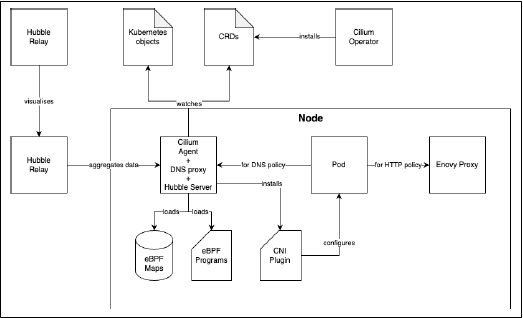
Cilium’s versatility stems from its modular design, composed of several core components that work together:
* Cilium Agent: The core daemon running on every node.
* Cilium CNI Plugin: Configures pod networking.
* Cilium Operator: Manages cluster-wide tasks.
* Cilium CLI: A command-line tool for management and troubleshooting.
* Hubble: The observability subsystem (Server, Relay, CLI, UI).
* eBPF Programs & Maps: The kernel-resident programs and data stores that power the datapath.
* Envoy Proxy: Handles L7 (HTTP/gRPC) traffic for policies, ingress, and service mesh.
* DNS Proxy: Enforces network policies based on domain names (FQDNs).
Deep Dive into Core Components
1. Cilium Agent
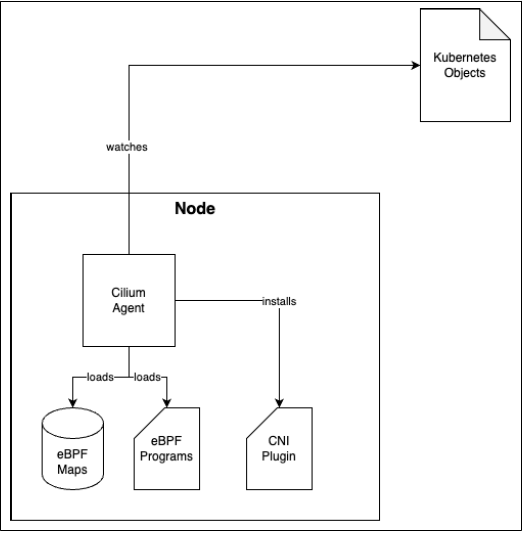
* What it is: A `DaemonSet` running with elevated privileges on every node. It’s the heart of Cilium’s node-level operations.
* Key Responsibilities:
* Installs and manages the CNI Plugin.
* Loads and manages eBPF programs and maps into the kernel.
* Watches the Kubernetes API for changes to Pods, NetworkPolicies, etc., and reconciles the state by updating eBPF maps.
* Tooling: The agent container includes a debugging tool called (formerly named `cilium`), used for detailed node-level diagnostics. This is distinct from the cluster-management Cilium CLI.
2. Cilium CNI Plugin
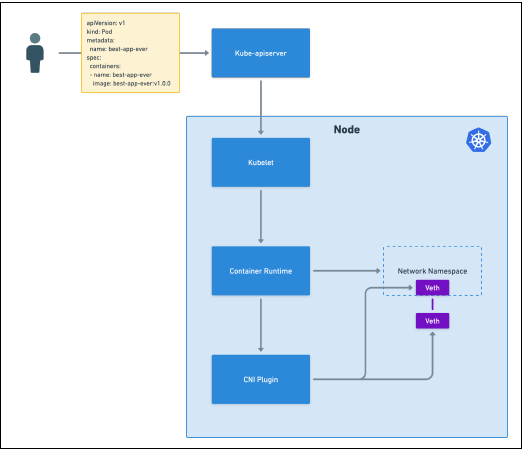
* Role: Implements the Container Network Interface specification. It is called by the container runtime (e.g., `containers`) when a pod is created to set up its network namespace, virtual ethernet devices (`veth` pairs), and routes.
* Location: Two key files on each node: the config (`/etc/cni/net.d/05-cilium.conflist`) and the binary (`/opt/cni/bin/cilium-cni`), both created by the Cilium Agent.
* Note: The CNI itself does not handle traffic forwarding or load balancing. That is the role of kube-proxy or, in Cilium’s case, its eBPF-based kube-proxy replacement.
3. Cilium Operator
* What it is: A cluster-level component deployed as a `Deployment`.
* Key Responsibilities:
* Manages Custom Resource Definitions (CRDs): Unlike many projects, Cilium’s Helm chart does not install CRDs directly. The Operator registers them, ensuring version compatibility. This means you must wait for the Operator to start before applying Cilium resources (e.g., `CiliumNetworkPolicy`).
* Handles IP Address Management (IPAM): In many modes (e.g., cluster-pool), the Operator manages IP allocation, creates `CiliumNode` objects for each node with `podCIDR` information, and prevents overlaps.

4. Cilium CLI
* Purpose: A separate command-line binary installed on an administrator’s machine for managing and monitoring Cilium across the cluster.
* Common Uses: Checking status (`cilium status`), running connectivity tests, installing/upgrading Cilium, enabling features, and collecting diagnostics (`sysdump`).
* Distinction: Different from the `cilium-dbg` tool inside the agent container, which is for low-level, node-specific debugging.
5. Hubble: Network Observability
Hubble is Cilium’s observability subsystem, built on top of its eBPF datapath to provide deep network visibility.
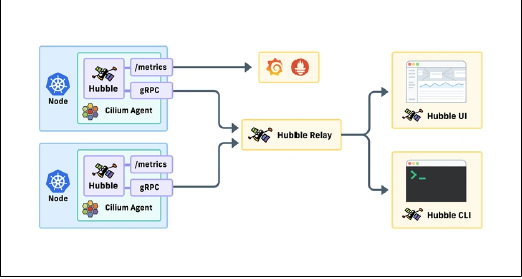
* Architecture (Reference: Figure 2-4):
* Hubble Server Embedded in the Cilium Agent on each node. Captures flow logs from eBPF.
* Hubble Relay: Aggregates flow logs from all Hubble Servers into a single, cluster-wide API. Deployed as a `Deployment`.
* Hubble CLI (`hubble`): A command-line tool to query and filter flow logs from Hubble Relay.
* Hubble UI: A graphical interface to visualize service dependencies and network traffic.
* Flow Logs: Provide rich information including source/destination pods, namespaces, Cilium identities, policy verdicts (ALLOWED/DENIED), and L4/L7 protocol details.
* Security: Connections between Hubble components are secured with mutual TLS (mTLS) by default.
6. eBPF Programs & Maps
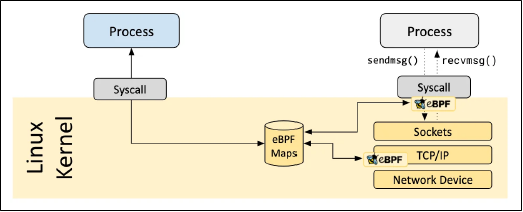
* eBPF Programs: Stateless, event-driven code loaded into the kernel and attached to “hook points” (e.g., network interfaces). They execute in real-time to make forwarding, filtering, and observability decisions.
* eBPF Maps: In-kernel data structures (hash tables, arrays, etc.) that store state. Programs read from and write to these maps to make dynamic decisions (e.g., looking up if a source IP is allowed by policy).
* In Cilium: eBPF programs handle L3/L4 networking and security. For complex L7 decisions (HTTP), traffic is redirected to the Envoy proxy in userspace.
7. Envoy Proxy
* Role: A high-performance, CNCF-graduated proxy. In Cilium, it is deployed as a `DaemonSet` (`cilium-envoy`) on each node.
* Handles: L7 functionality that eBPF does not, including:
* HTTP-based `CiliumNetworkPolicies`
* Ingress & Gateway API routing and TLS termination
* Advanced traffic management (retries, weighted load balancing)
* Implication: If the Envoy proxy becomes unavailable, L7 features for pods on that node will be impacted.
8. DNS Proxy
* Role: Enables network policies based on Fully Qualified Domain Names (FQDNs). It intercepts DNS traffic to learn mappings between domain names and IP addresses, then updates eBPF maps to allow/deny traffic accordingly.
* Benefit: Essential for dynamic environments where pod IPs change, as policies can be based on stable domain names.
* Location: Runs as part of the Cilium Agent Pod on every node.
* Implication: If the Cilium Agent is down, FQDN-based policy functionality is affected.
Putting It All Together
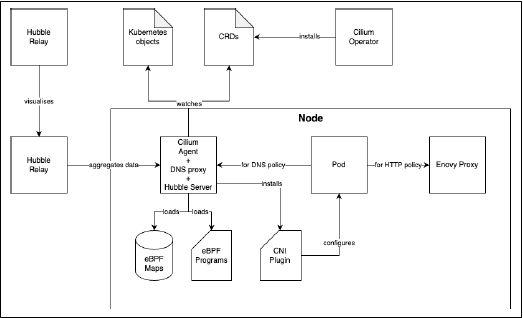
1. The Operator creates CRDs.
2. The Agent watches these CRDs and other Kubernetes objects, loads **eBPF programs/maps**, and installs the **CNI Plugin**.
3. When a pod sends traffic, an **eBPF program** intercepts it.
4. For L3/L4 decisions, the program consults **eBPF maps** and forwards/drops the packet.
5. For L7 or FQDN policies, traffic is redirected to the **Envoy** or **DNS Proxy**, respectively.
6. The **Hubble Server** observes all traffic, enriching flows with DNS data.
7. The **Hubble Relay** aggregates this data cluster-wide.
8. The **Hubble UI** or **CLI** consumes the data for visualization and analysis.
